v1.1.0 — Now with standalone mode
Claudine

A kanban board for Claude Code

See all your AI conversations at a glance. Auto-status detection, full-text search, drag‑and‑drop, and real‑time sync — right inside VS Code.

The Board

Your conversations,
organized

Claudine reads Claude Code's session files and renders them as a kanban board. Cards move through columns automatically as conversations evolve.
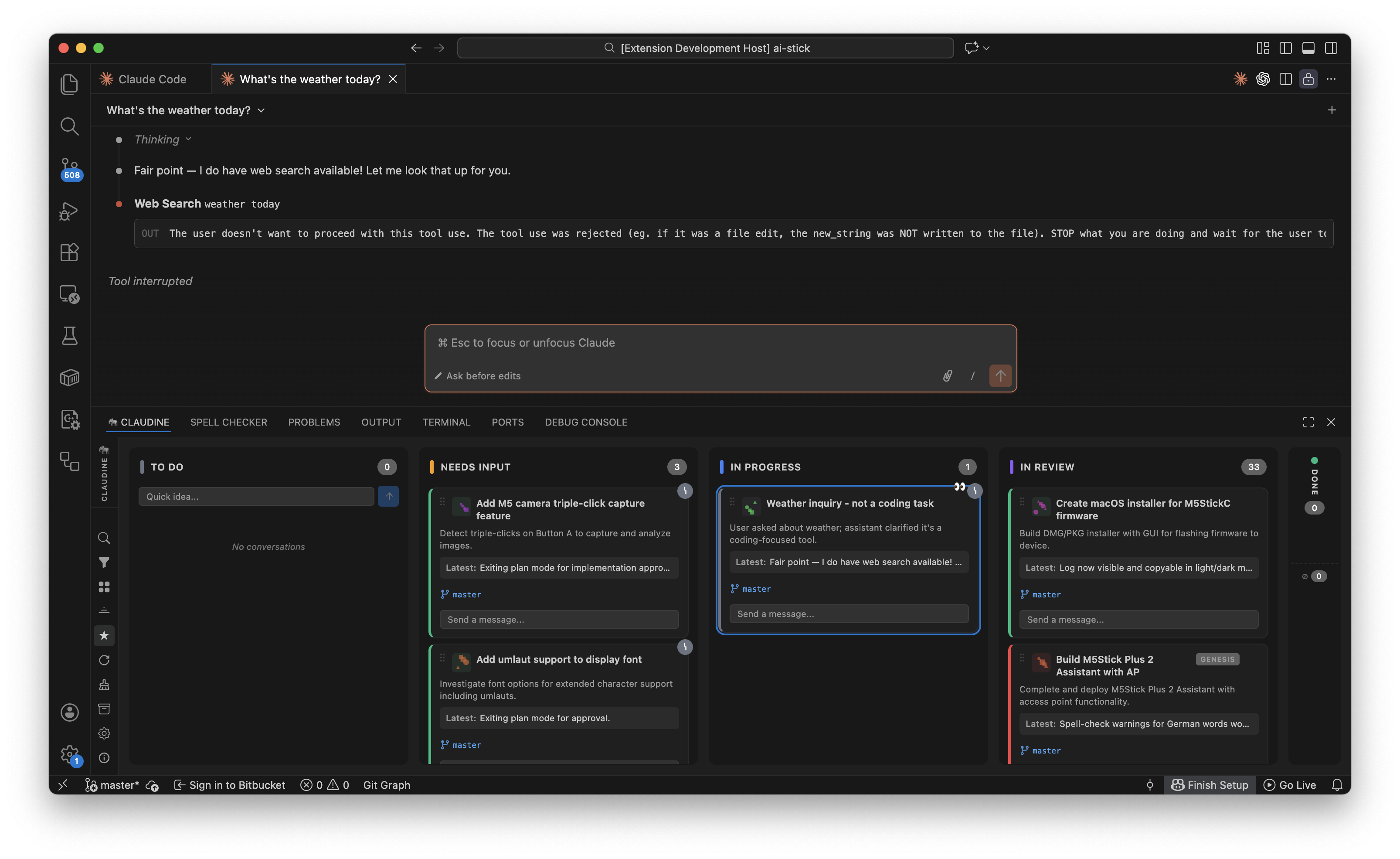
Claudine kanban board screenshot
Auto-status detectionCategory classificationDrag and dropFull-text searchReal-time syncInline promptsQuick ideasNeeds Input alertsActive agent indicatorsConversation focus trackingGit branch displayAgent integrationAI-generated iconsAI summariesExport & importPanel or sidebar
🔍

Watch

Claudine watches your Claude Code conversations for changes. Every new message is automatically synchronised with the kanban board.

⚙️

Auto-categorize

Claudine extracts title, description, status, category, agents, git branch, and error state. It automatically infers the status of each task.

📈

Render

The board updates in real time. Manual overrides (like dragging a card to Done) are preserved until new conversation activity resets them.

Toolbar

Everything at your fingertips

The sidebar toolbar and title bar actions give you instant control over the board. Every button has a keyboard shortcut.

Search

Cmd+Shift+F

Full-text search across card titles, descriptions, and the raw JSONL conversation content. Toggle between fade and hide modes.

Filter

Category

Filter the board by category: Bug, Feature, User Story, Improvement, or Task. Quickly focus on a specific type of work.

Compact View

Toggle

Switch between full and compact card layouts. Compact mode shows only the title and status, great for boards with many conversations.

Expand All

Toggle

Expand or collapse every card on the board simultaneously. Useful for getting a quick overview or diving into details.

Summarize

AI

AI-powered summaries for card titles and descriptions using the Claude CLI. Toggle between original and summarized text on the fly.

Refresh

Cmd+Shift+R

Force a full re-scan of all conversation files. The board normally updates in real time via file watchers, but refresh is there when you need it.

New Conversation

Cmd+Shift+N

Start a new Claude Code session directly from the board. Enter your prompt and it opens as a new conversation card automatically.

Settings

Panel

Configure API keys for icon generation (DALL-E / Stability AI), summarization, view placement (panel or sidebar), and toolbar location.

Zoom Controls

Scale the board from 50% to 150%. Use Ctrl+= / Ctrl+- or the sidebar buttons. Ctrl+0 resets.

Archive

Completed and cancelled conversations auto-archive after inactivity. Toggle the archive column to review or restore them at any time.

Close Empty Tabs

After VS Code restarts, it may re-open empty Claude tabs. One click cleans them all up. Available from the toolbar overflow menu.

Standalone Mode

Beyond VS Code

Run Claudine without VS Code. A local HTTP + WebSocket server launches in your browser, giving you the full kanban board experience — for every project on your machine.

terminal
# Start standalone
$ npm run standalone
Server running at http://localhost:5147
# Or with options
$ npm run standalone -- --port 8080 --no-open

Multi-project view

  • Monitors all Claude Code instances across every project on your machine (scans all ~/.claude/projects/ directories)
  • Conversations grouped by project with a sidebar navigator and collapsible project panes
  • Activity indicators: blue dot = in-progress, amber dot = needs attention
  • Click any project to zoom into a full-screen board
  • Stale projects auto-collapse after 24h of inactivity

Browser experience

  • WebSocket transport with automatic reconnection (exponential backoff)
  • Theme toggle — cycle between auto, dark, and light themes; auto-detects system preference
  • Desktop notifications — browser alerts when a conversation needs your input
  • CLI flags: --port, --host, --no-open, --help
  • Platform abstraction layer — all core services decoupled from VS Code APIs via IPlatformAdapter

Get started in
two minutes

Install the extension, open VS Code, press Cmd+Shift+K. That's it.

01

Install

Search for "Claudine" in the VS Code Extensions view and install it from there.

02

Open the board

Press Cmd+Shift+K or find the elephant icon in the panel tab. Your conversations appear automatically.

03

Work

Start conversations with Claude Code. Claudine detects them in real time, auto-classifies status and category, and keeps everything organized.

Stay in the Loop

Get updates on new features, integrations, and signal wisdom. No spam, unsubscribe anytime.